Texture Instructions
A Texture Instruction is a step in the Baking process that adds a texture on top of the current Baked Texture. This texture is usually an EZRecolor Texture Mask with Color Replacement IDs assigned to it, but it can be anything you want. You can then place it properly with scale, rotation and offsets.
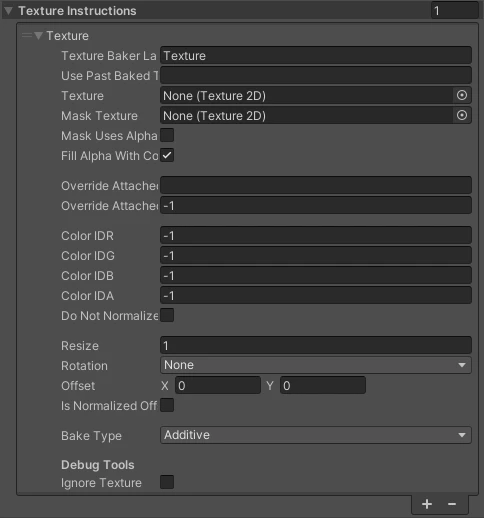
Properties of a Texture Instruction within a Baked Texture of a Baked Material
Fields
| Field | Type | Description |
|---|---|---|
| Texture Baker Label | Text | A Label to help with the readability of the Template, it doesn't display in the Baker window but could be used in other ways. |
| Use Past Baked Texture Name | Text | Allows to reuse a past baked texture without rebaking it and save on baking time. If a name is set, only the texture field will be ignored and the texture with this name will take its place. The selected baked texture with the corresponding name needs to be baked before this step runs. |
| Texture | Texture2D | The Texture to use for this instruction. |
| Mask Texture | Texture2D | Mask to mask out unused areas of the texture. Useful for fitting smaller textures on top of the baked texture. Needs to be the same resolution as the source texture! |
| Mask Uses Alpha | Boolean | If this is on, the alpha channel of the mask will be used instead of the Red color channel to mask out the texture. |
| Fill Alpha With Color | Boolean | If this is on, the alpha channel of the mask will have its transparent parts filled in with the baked color. Useful to fix black edges around the transparent parts (which is ending up being the selected start color of the baked texture). |
| Override Attached Mesh GO Name | Text | Set the mesh GameObject and material slot to read for this specific texture. If no name is set or the slot is -1, these will be ignored. |
| Override Attached Mesg GO Slot | Int | Set the mesh GameObject and material slot to read for this specific texture. If no name is set or the slot is -1, these will be ignored. |
| Color ID R | Int | Red channel. Set to -1 or 0 if unsassigned. Valid EZRecolor Color Replacements start at 1. |
| Color ID G | Int | Green channel. Set to -1 or 0 if unsassigned. Valid EZRecolor Color Replacements start at 1. |
| Color ID B | Int | Blue channel. Set to -1 or 0 if unsassigned. Valid EZRecolor Color Replacements start at 1. |
| Color ID A | Int | Alpha channel. Set to -1 or 0 if unsassigned. Valid EZRecolor Color Replacements start at 1. |
| Do Not Normalize HDR Colors | Boolean | By default, to ensure correct bake of emmisive textures using an HDR color tint, the colors of the textures are normalized so that the maximum color value is 1 and then the HDR tint field on the final material can be desaturized to give the final look. However, in some cases you might want this off. Example, baking an emissive texture using an HDR tint and assigning it to a shader property that doesn't have an HDR tint (like VRChat Mobile Toon Lit). |
| Resize | Float | Scale of the texture. Keep at 1 for native resolution. |
| Rotation | Float | Rotation of the texture. Currently supports 90, 180 and 270 degrees rotation (Clockwise). In the future, it could support non-90 degree rotations. |
| Offset | Vector2 | Offset of the texture. Keep at [0,0] for original alignment. The alignment uses the bottom left corner of the texture. |
| Is Normalized Offset | Boolean | If true, the above offset will use 0-1 normalized values (e.g. the middle of a 1024x1024 texture would be 0.5). If false, it'll use pixel coordinates (e.g. the middle of a 1024x1024 texture would be 512). |
| Bake Type | Enum | How should this texture instruction be baked on top of the previous steps? Overlay: Apply the texture like a sticker on top of the current bake Additive: Add the colors of this texture with the colors of the bake behind it Multiply: Multiply the colors of this texture with the colors of the bake behind it Replace Everything: Replace all values of the bake (including transparency and including masked area) from the bake with this texture's. |
| Ignore Texture | Boolean | Ignore this texture step while baking. Useful for creators to debug custom templates. |
Bake Types
Texture Instructions support a couple of Baking types, so here's a chart on how that works:
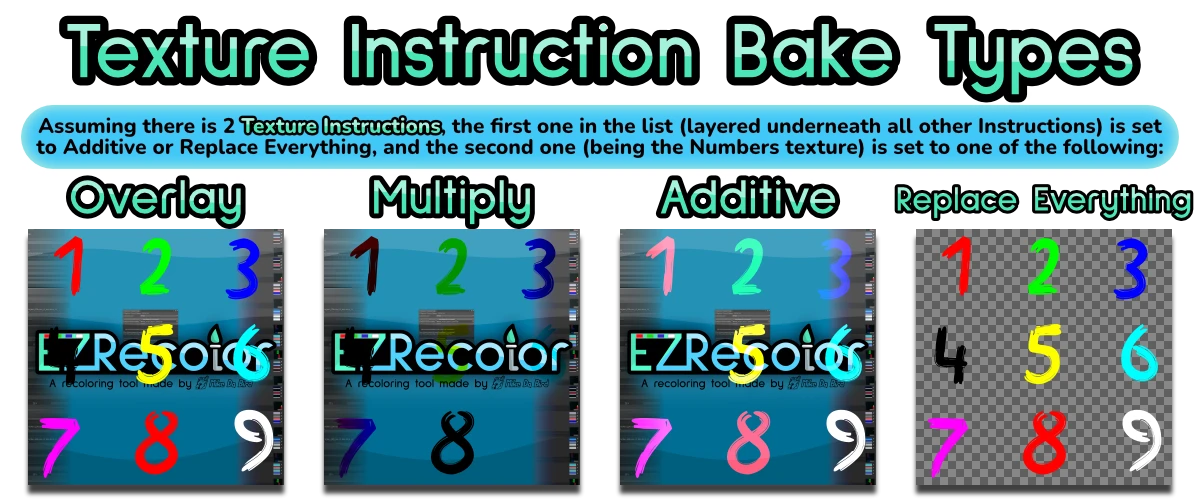
Graphics on how each Bake Type works