EZRecolor Channel Packed Mask
For the EZRecolor Materials to work, you will need Channel Packed Textures. This type of texture utilizes the fact an image has 4 color channels (Red, Green, Blue, Alpha) and assigns a specific type of data per channel as Black & White. In the case of EZRecolor, each channel of a Channel Packed Texture is assigned a Color Replacement in the EZRecolor Material to correctly place each Color Replacements on the final Texture.
Mask Builder
To make the process of making these masks less tedious, a Mask Builder tool is included with EZRecolor, found through the menu bar at the top of Unity under Mike Da Bird > EZRecolor > Mask Builder.
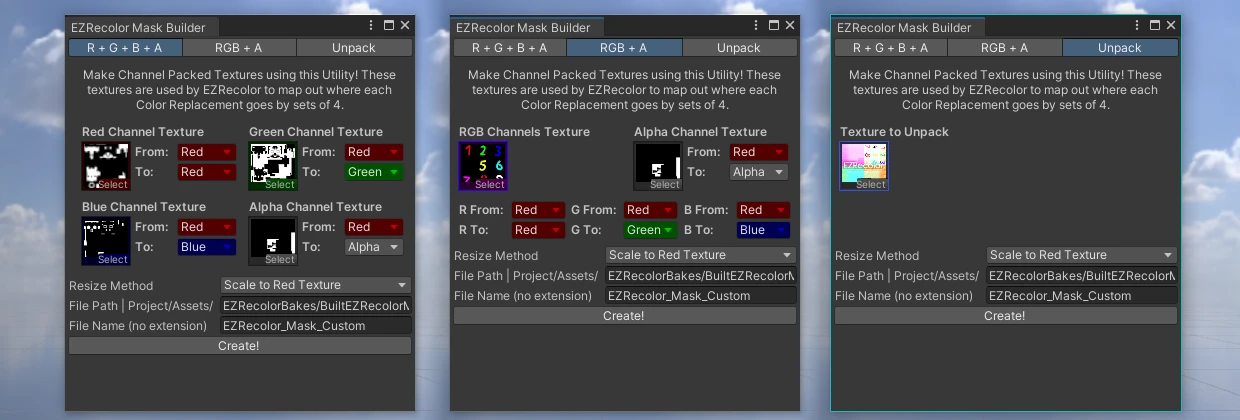
Left: Pack from RGBA Separate | Middle: Pack from RGB and A separate | Right: Unpack Mask into grayscale textures
The process is straightforward: Assign a Texture in the Red, Green, Blue and Alpha Texture Slots, set an export folder and name, then press Create!
You can also use a single RGB Texture and an Alpha Texture to merge them by selecting the ``RGB + A` Tab in the same Mask Builder Window.
Finally, there are some From and To dropdowns per Texture / Color Channel. These will route the From Color Channel of the selected Texture into the To Color Channel of the final Channel Packed Texture. By default, the tool reads from the Red channel of each selected Textures (assuming it's greyscale) and outputs themselves to their respective Channel in the final Texture. If using the RGB + A mode, then each of the RGB Channels of the selected RGB Texture will be routed to the corresponding RGB Channel of the final Texture, while the Alpha Texture is set to Red for From and Alpha for To.
If you own the Supporter Edition, you are able to customize the Color Channel routing (the From and To fields) to your own desire. This is locked in the Lite Edition.