EZRecolor Templates
EZRecolor Templates are the foundations allowing the EZRecolor Baker to know how an Asset or Prefab is baked. It consists of multiple different settings that allow you to bake Textures, Materials and Prefabs in almost any ways you can imagine!
This part of the guide assumes that you've created your Texture Masks, EZRecolor Materials and have some reference Prefabs for Prefab generation ready)
Creating a Template
To create an EZRecolor Template, go to your Project Tab, right click in an empty space, and select Create > Mike Da Bird > EZRecolor > Baker Template
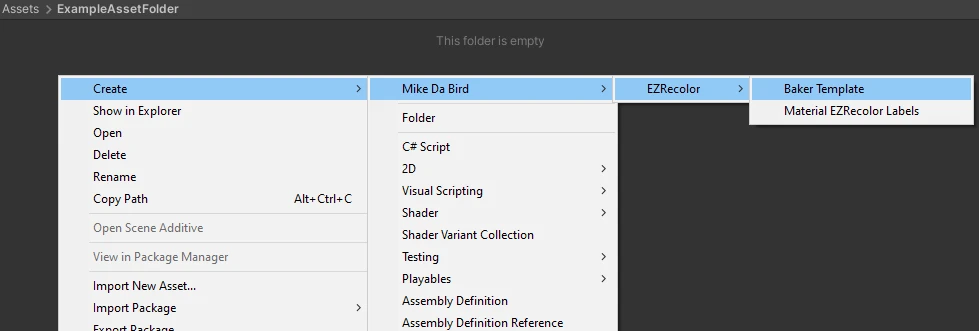
The right click menu to go to
This will create a Blank Template with some fields already pre-filled. Let's see how to set up an EZRecolor Template Project.
Template Project Settings
A couple of General Project Settings exist within an EZRecolor Template, and are on a per-Template basis. You can also put in some Metadata for creator information!
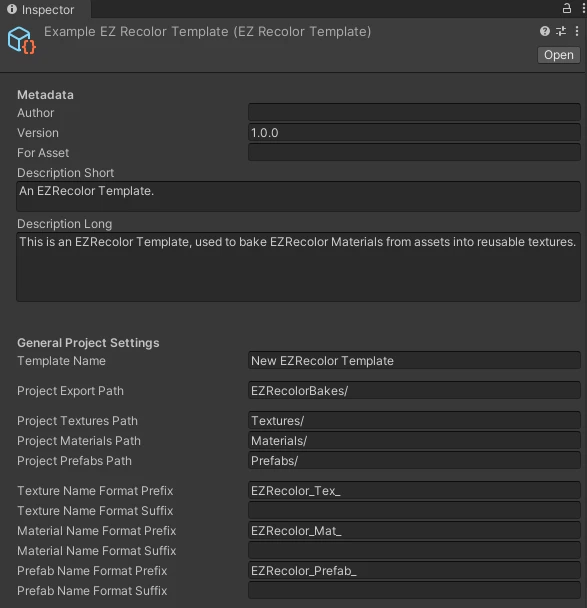
The General Properties of an EZRecolor Template
Metadata
| Field | Type | Description |
|---|---|---|
| Author | Text | Name of the author of the template. |
| Version | Text | Version of the template. |
| For Asset | Text | Name of the asset this template was built for. |
| Description Short | Text | Short description of the template. |
| Description Long | Text | Description of the template. |
General Project Settings
| Field | Type | Description |
|---|---|---|
| Template Name | Text | Name of the template. This is what's going to be displayed when selecting a template in the dropdown of the EZRecolor Baker window. |
| Project Export Path | Text | Relative to the Assets folder. This is the folder where all bakes of this template will end up. Name of each bake is set via the Baker window and will have a sub-folder for it using it. |
| Project Textures Path | Text | Relative to the Project Export Path folder. This is the folder where all Textures of this template will end up. |
| Project Materials Path | Text | Relative to the Project Export Path folder. This is the folder where all Materials of this template will end up. |
| Project Prefabs Path | Text | Relative to the Project Export Path folder. This is the folder where all Prefabs of this template will end up. |