EZRecolorComponent
The EZRecolor Component is a script placed onto an EZRecolor Prefab that allows to bake a prefab directly from the Inspector Tab.
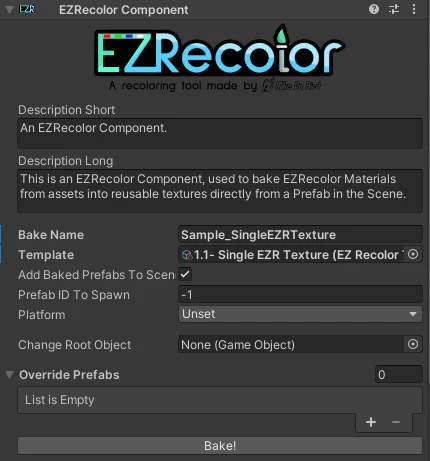
The EZRecolor Component
EZRecolor Components have several advantages compared to the EZRecolor Baker Window method,such as:
- The setup is curated by the Asset Creator, meaning much less chances of breakage;
- The ability to override the Baked Prefabs with new ones;
- The ability to set a specific prefab to spawn instead of just the first valid one baked;
- If you're making VRChat Avatars, the ability to automatically bake the EZRecolor Avatar non-destructively and upload the Baked version when the Upload button is pressed in the Builder Window.
To setup
- Add this component on the prefab you wish to bake (in the Create Component menu, it is found under
Mike Da Bird > EZRecolor > EZRecolor Component) - If placing the Component under a Child object of the prefab (like a separate "EZRecolor" object under the Prefab's Root), assign the Root of the Prefab to the Change Root Object field.
- Set the Template to use and a Bake Name.
- Assign a Platform for your asset (if doing a VRChat avatar. set it to VRChat or VRChat Quest)
- If you wish, assign Override Prefabs to the Component (not required).
- Just in case, you can also assign a specific Prefab ID to spawn and use (it's the index from the top of the Baked Prefabs list)