Baking into Textures
Ready to bake your EZRecolor Materials into reusable textures? This page details how to proceed with this step!
As with the Recoloring Assets page, we will be using the Avigen by Mike Da Bird (the developer of EZRecolor) to demonstate how baking EZRecolor Materials goes.
2 Methods of Baking
EZRecolor includes 2 paths to bake your recolors. The best path depends on how the Asset's Creator has set up their asset:
- Through the EZRecolor Baker Window
- Through an EZRecolor Component on the Prefab
The EZRecolor Baker Window
The EZRecolor Baker Window is a Unity Editor Window that is able to bake a Prefab you select using one of the Templates available in the project.
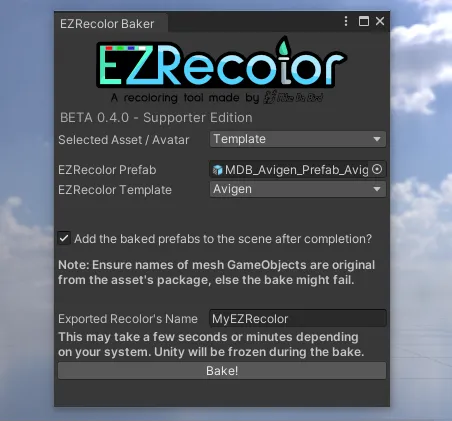
The EZRecolor Baker Window, found under Mike Da Bird > EZRecolor > Baker Window
| Pros | Cons |
|---|---|
| Accessible anywhere | Prone to user error (selecting a prefab incompatible with a selected template) |
| Can bake single materials without templates |
To use
- Open the Baker window through the menu bar at the top of Unity, found under
Mike Da Bird > EZRecolor > Baker Window. - Drag and Drop the EZRecolor Prefab you edited under the Prefab field.
- Set the Baking mode to Template and select the correct template through the dropdown menu
- Set a name for your recolor, then press Bake!
If you are baking an avatar made by Mike Da Bird with the Baker Window, after importing the avatar you can select it through the Select Asset dropdown instead of the Template dropdown
The EZRecolor Component
The EZRecolor Component is a script placed onto an EZRecolor Prefab that allows to bake a prefab directly from the Inspector Tab.
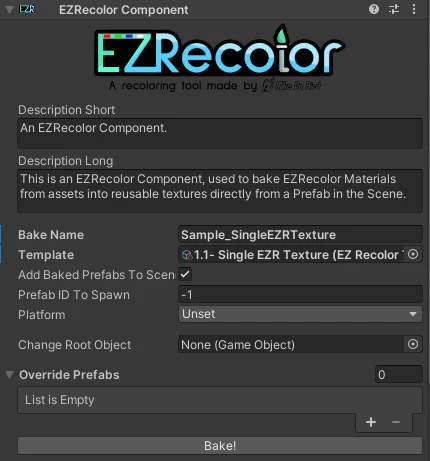
The EZRecolor Component
| Pros | Cons |
|---|---|
| Curated by the Asset Creator | Creator needs to include it on the asset (could not always be the case) |
| Allows overriding what prefabs are baked | |
| Allows to set a preferred prefab to spawn | |
| If added on a VRC Prefab, allows to Auto Bake in a non-destructive way on Avatar Upload |
To use
- Select the GameObject in the hierarchy of the Prefab containing the EZRecolor Component (could be the root of the Prefab or a child GameObject of it)
- Set a name for your recolor, then press Bake!